AI Video Generator - ArtReel
- 4.6
- Rating
- 100.00K
- Installs
- Free
- Price
 Analysis by App-foxy
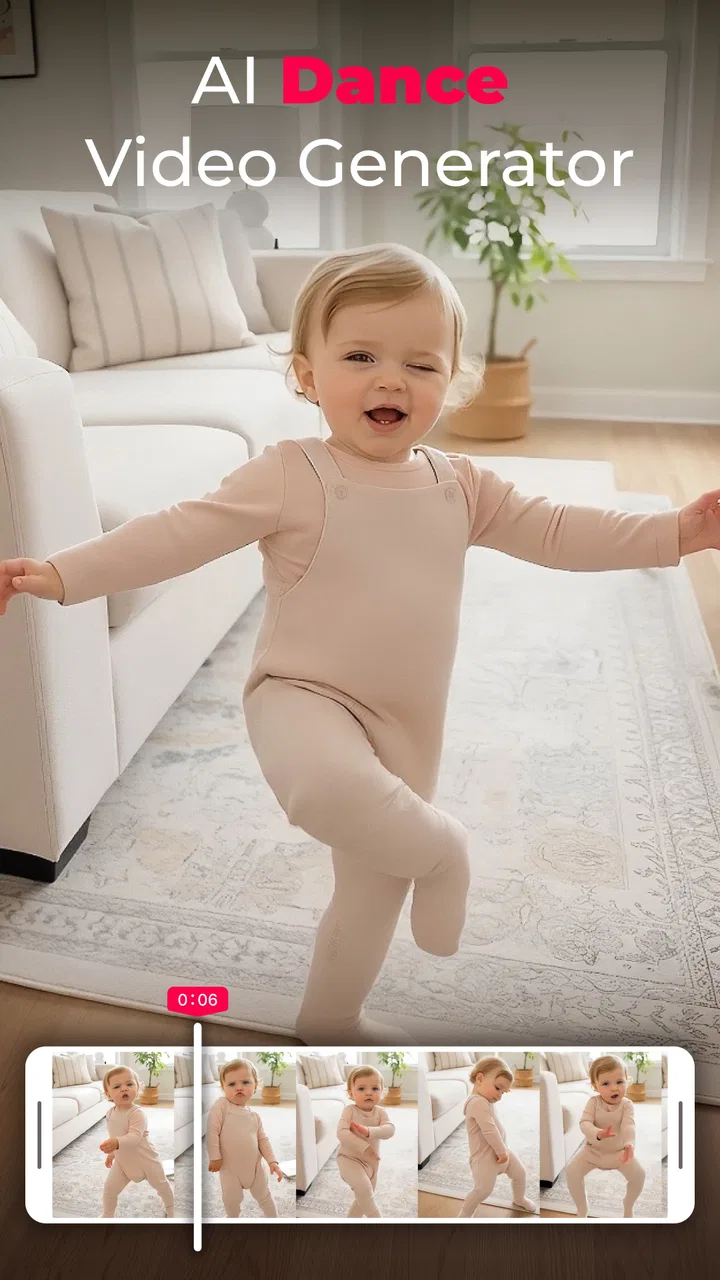
AI Video Generator - ArtReel is a photography app from Smart AI DEV that turns the idea of an AI-made short video into something approachable for a first-time user. I found its appeal easy to understand: instead of beginning with a complicated editor, you start with the kind of visual concept people already enjoy sharing, including playful clips inspired by the baby dance trend. The app is free to install, rated for Everyone, and designed for Android devices running version 5.0 or later.
My first impression was that ArtReel is best understood as a quick creative tool rather than a full replacement for a traditional video editor. It is aimed at making a striking result from an image and an idea, not at giving you a complete timeline with detailed control over every frame. That distinction matters. If you want a fast way to experiment with AI video, it is inviting. If you need precise editing, layered sound design, or professional production controls, you may eventually prefer a conventional editor.
What to expect from ArtReel
The central experience is built around generating short AI videos. You provide the visual starting point and guide the result toward a particular action or mood. The store summary highlights viral-style creations, so the app makes the most sense for social posts, humorous experiments, family-friendly creative projects, and quick visual greetings rather than long-form filmmaking.
You May Also Like

 Pandora - Music & Podcasts
Pandora’s Music Is Easy to Start, but Harder to Recover
Pandora’s strength is its low-effort path from a seed to a station. Its weak spot is how much confidence it asks you to place in connection, setup, and quiet recovery.

 8 Ball Pool
 Is Built on Rivalries, Rematches, and Routine
A close look at the rivalries, rematches, shared routines, and unanswered safety questions that turn a quick pool match into a persistent mobile community.

 Samsung Music
’s Quiet Strength Is Playing What You Already Own
Its reach comes less from spectacle than from dependable access to a personal library. That simplicity is both the app’s strongest retention engine and its ceiling.

 AccuWeather: Weather Radar
AccuWeather Review: A Quick, Clear Forecast for Everyday Decisions
For everyday plans, the best forecast is the one you can understand quickly. AccuWeather makes rain timing, radar, and local conditions easy to act on, with a few trade-offs.

 Hill Climb Racing
Why Hill Climb Racing Still Turns Crashes Into One More Run
A tiny car, a bumpy hill and one more upgrade: Hill Climb Racing keeps resurfacing because its simple chaos makes every near-miss feel personal.

 AliExpress - Shopping App
AliExpress Makes Global Shopping Feel Personal, but Shoppers Bear the Risk
AliExpress turns a global marketplace into a pocket-sized discovery engine. Its reach is useful, its shopping loop compelling, and its trade-offs easy to miss.
More From Our News Desk
View All News


I would approach the app with a simple expectation: the first result is a starting point, not necessarily the final clip. AI animation can produce charming movement, but it can also interpret a prompt or image in an unexpected way. A good workflow is to begin with a clear, uncomplicated idea, inspect the output, and then adjust your source image or wording instead of trying to describe an entire story at once.
The app has attracted an average rating of 4.6 from around 13 thousand ratings, with over 100 thousand installs. Those figures suggest that the basic concept is connecting with a meaningful audience, although popularity should not be confused with guaranteed results for every image. Your source material still has a major influence on whether the generated motion looks convincing.
Because ArtReel sits in the photography category, I see it as an image-first tool. That is useful if your camera roll already contains portraits, pet pictures, travel snapshots, or simple illustrations that you want to animate. It is less suitable if your main goal is to assemble several recorded video clips, trim them precisely, add multiple tracks, and control the final edit manually.
Who will enjoy it most
ArtReel is a strong fit for someone who wants a low-pressure introduction to AI video. You do not need to know keyframes or video codecs to understand the basic appeal. It is also a natural choice for people who enjoy testing social-media trends without spending an evening learning a complex editing suite.
I can also see it working well for a family group chat. Imagine choosing a cheerful portrait, creating a playful dance-style animation, and sending the result as a surprise birthday message. The value is not cinematic quality; it is the speed and novelty of turning an ordinary picture into something shareable.
On the other hand, I would skip it if your priority is exact identity preservation, controlled choreography, or repeatable commercial output. AI movement may not behave consistently from one attempt to another, and a traditional editor will remain better for arranging footage that you have already recorded. The right choice depends on whether you want spontaneous transformation or detailed control.
Getting started without unnecessary guesswork
After installing the app, I recommend beginning with one image that has a clear subject and a relatively simple background. A well-lit portrait or a clean picture of one pet is easier to evaluate than a crowded group photo. This is not a strict technical requirement; it is simply a practical way to reduce visual confusion while you learn how ArtReel interprets your material.
Before creating anything elaborate, decide what you want the viewer to notice first. “Make this person perform a playful dance” is a more useful starting idea than a long description containing several actions, camera movements, and emotional changes. A focused request gives you a better chance of recognizing what worked and what needs changing.
The app is free to use in its basic availability, while in-app purchases range from $3.99 to $59.99 per item. I would avoid committing to a purchase before you have tested the kind of results you actually want. First-time users should learn the creation flow, understand how satisfying the outputs are, and only then decide whether paid options fit their habits.
That advice is especially important for casual users. If you only expect to make one funny clip every few weeks, a paid upgrade may not offer enough value for you. Someone who regularly creates AI visuals for personal posts may judge the options differently. In either case, treating the free experience as a trial of the workflow is more sensible than assuming every generated clip will be worth paying for.
Your first meaningful creation
For a reassuring first attempt, choose a single-subject image and aim for one obvious action. The baby dance style mentioned by the app is a useful example because it gives you a clear visual goal: the subject should appear lively, rhythmic, and playful. Keep the concept light rather than demanding a complicated scene with several characters interacting.
Once the result appears, watch it more than once. On the first viewing, you will probably notice the novelty. On the second, look for practical details: does the subject remain recognizable, does the movement feel connected to the body, and does the background distract from the action? This second check is where ArtReel becomes more useful than a simple novelty button, because it encourages you to judge the source image and the instruction together.
A helpful trick is to change only one variable between attempts. If you replace the image and rewrite the idea at the same time, you will not know why the next result improved or became worse. Keep the same concept while trying a cleaner image, or keep the image while simplifying the action. That small habit makes experimentation much less frustrating.
Another practical insight is to select images with room around the subject. A tightly cropped face or body can limit how natural a larger movement appears. A little visual space gives the animation more opportunity to suggest motion without making the subject seem cut off. I would also avoid starting with reflective surfaces, heavy shadows, or many overlapping objects, since those details can make the result harder to judge.
Making the result easier to share
Think about the destination before you generate. A short, instantly understandable idea usually works better for a social post than an ambitious mini-story. If you are sending the clip privately, you can prioritize humor or surprise. If you are posting publicly, a recognizable subject and a simple action make the result easier for someone else to understand without explanation.
I would keep the original image saved separately and treat each generated version as an experiment. That gives you freedom to try different directions without losing the starting point. It also helps when you want to compare a natural portrait with a more stylized picture and decide which one produces the more appealing motion.
ArtReel is not the place where I would do all finishing work. If the generated clip needs trimming, captions, music, or a carefully timed introduction, I would move it into a familiar video editor afterward. This two-step workflow is often more effective than expecting one app to handle both AI generation and detailed post-production equally well.
Common points of confusion for new users
The biggest misunderstanding is expecting the app to behave like a conventional animation editor. ArtReel generates an interpretation, while a timeline editor lets you specify exactly when and how an object moves. If the first output feels surprising, that does not necessarily mean the app failed; it may mean the source image or requested action left too much room for interpretation.
Another common issue is judging the result from the idea alone. A prompt can sound perfect, but the image may not provide enough visual information for the intended movement. For example, a distant subject, a partially hidden face, or a complicated background can make a dance-style transformation less convincing. When that happens, improving the picture may help more than adding extra words.
It is also easy to overcomplicate the first attempt. New users often want a person to dance, wave, turn, change clothes, move through a room, and interact with another subject all at once. I would resist that temptation. One clear action gives you a reliable baseline and makes the app feel more predictable.
Results can also feel different depending on the source material. A front-facing picture with a recognizable pose communicates differently from a side profile or an image where the subject is partly outside the frame. I would not treat one disappointing result as a final verdict on ArtReel. Test a second image with a simpler composition before deciding whether the app suits you.
The purchase structure deserves attention too. Since individual in-app items can cost from $3.99 to $59.99, check your intended use before spending. A person casually exploring the trend has a different threshold from someone who plans to generate content frequently. My recommendation is to identify the exact benefit you want from a purchase instead of buying simply because the first result was entertaining.
Version 1.2.6 is the current version, and the app supports Android 5.0 and later. That broad operating-system compatibility makes it accessible to many Android users, but compatibility alone does not guarantee that every device will feel equally quick or comfortable during creation. On an older phone, I would keep expectations realistic and avoid judging the creative concept solely by how long a generation takes.
The Everyone content rating also makes ArtReel approachable for a broad audience. Even so, I would still think carefully about the photos you choose and where you share the finished clips. A family-friendly rating describes the app’s intended audience; it does not remove the need to make sensible choices about personal images and public posting.
Three workflows that reveal its real value
The first workflow is a “before and after” experiment. Use a normal portrait, create a playful movement, and compare it with a more expressive illustration of the same idea. This shows you whether you prefer realistic transformations or stylized ones, and it helps you build a personal sense of which images work best.
The second is a small reaction library. Instead of generating random clips, prepare a few everyday moods such as celebration, surprise, encouragement, or congratulations. A single photo can become a reusable visual response for friends, provided you are comfortable sharing that image. This turns ArtReel from a one-time trend experiment into a lightweight source of personalized messages.
The third is a controlled social-post workflow. Create one focused clip, review it for distracting artifacts, and then finish it elsewhere with a short caption or title if needed. The important trade-off is speed versus control: ArtReel handles the imaginative transformation, while another editor handles the presentation. That division of labor is more realistic than demanding a complete production suite from a photography app.
These workflows also show when the app is not the best option. If you need a polished advertisement, a precisely timed tutorial, or a sequence built from several real recordings, begin with a standard editor. If you want a quick visual surprise from one image, ArtReel is the more direct route.
My recommendation after using the concept in practice
What I like most about ArtReel is the low barrier between having an image and having a creative idea to share. The baby dance style gives beginners an obvious first project, and the image-first approach keeps the experience less intimidating than a full editing timeline. I also appreciate that the app can be explored without treating every user as a professional creator.
What I would keep in mind is the variable nature of AI output. The app can make an ordinary image feel fresh, but it cannot guarantee that every pose, face, or movement will look natural. The best results come from choosing a strong source image, describing one action, and evaluating the output calmly instead of expecting perfection on the first try.
For a first-time user, my suggested path is simple: install it, select a clear single-subject photo, try one playful movement, and inspect the result before changing anything else. If the output is promising, repeat the idea with a better image or a shorter instruction. If you need captions, music, or exact timing, finish the clip in a conventional editor rather than fighting the limits of an AI generator.
Smart AI DEV has positioned this free photography app around quick AI video creation, and that focus is easy to understand. I would recommend it to curious Android users who want to experiment with viral-style visual ideas, make amusing personal messages, or animate pictures without learning advanced editing. I would not recommend it as the only tool for serious production work.
Overall, ArtReel is most enjoyable when you treat it as a creative sketchbook. It gives you a fast way to test a visual idea, discover which photos animate well, and create something that feels more alive than the original still image. With sensible expectations and a willingness to refine your starting material, it can deliver exactly the kind of quick, shareable experiment that makes AI photography apps fun.
FAQs for AI Video Generator - ArtReel
01What is AI Video Generator - ArtReel, and what can I create with it?
AI Video Generator - ArtReel is designed to help users create short videos and visual content with artificial intelligence. Depending on the available tools and selected plan, you can typically start from a text prompt, image, or creative template and generate stylized clips, animated scenes, or social-media-ready videos. It is aimed at beginners as well as creators who want to produce content without advanced video-editing skills.
02Is AI Video Generator - ArtReel free to download and use?
The app may be available to download for free, but some generation tools, export options, premium styles, or higher-quality results can require in-app purchases or a subscription. Before creating multiple projects, check the pricing page and trial conditions carefully. Also review whether credits are consumed per generation, because AI video creation can use credits quickly, particularly for longer videos or high-resolution exports.
03Does ArtReel require an internet connection to generate videos?
Yes, users should expect an active internet connection for most AI generation features. The processing is generally performed on remote servers rather than entirely on the phone, so prompts, images, and generation requests need to be uploaded for processing. A stable Wi-Fi or mobile-data connection can help prevent failed jobs, long waiting times, or interruptions when downloading the finished video.
04Can I use the videos created with ArtReel for commercial purposes?
Commercial usage depends on the app’s current terms of service, the subscription level you choose, and sometimes the source material used in the project. Before publishing generated videos for advertising, business, or monetized social-media content, read the licensing rules carefully. You should also avoid uploading copyrighted images, logos, music, or characters unless you have permission to use them.
05What should I know about privacy when using AI Video Generator - ArtReel?
Using an AI video generator may involve uploading prompts, photos, reference images, or other personal content to the developer’s servers. Before signing in or importing private media, review the privacy policy to understand how files are stored, processed, shared, and deleted. Avoid submitting sensitive documents, identifiable personal information, or images of other people unless you have their consent.
Pros
- Turns text prompts and images into short AI-generated videos.
- Offers creative templates for social media-ready content.
- Simple interface suitable for beginners without editing experience.
- Useful for experimenting with visual ideas quickly.
- Supports fast creation without requiring advanced video software.
Cons
- Output quality can vary depending on the prompt and source image.
- Free usage may be limited by credits
- watermarks
- or export restrictions.
- Complex scenes and precise character movements may look inconsistent.
- Video generation can consume significant battery and mobile data.
- Some features may require a subscription or in-app purchases.

AI Video Generator - ArtReel
Gallery